Minecraft Hosting
 VPS Hosting
 Ryzen VPS Hosting
 FiveM Hosting
Introduction to RedM and Server Hosting
RedM is a popular multiplayer modification for Red Dead Redemption 2 that allows players to create and manage their own custom servers. With RedM, you can bring unique role-playing games, missions, and adventures to life in a multiplayer world.
To set up a RedM server, you need a stable and powerful hosting solution that can handle the game's resource-intensive requirements. In this guide, we'll walk you through how to set up a RedM server, as well as the best hosting options for optimal performance.
Why Choose RedM Server Hosting?
A dedicated server for RedM ensures a smooth gaming experience, low latency, and full control over your server. Hosting a RedM server requires a powerful infrastructure to ensure stability and speed.
Advantages of professional RedM hosting:
- High-performance hardware – The use of modern processors and SSD storage ensures fast performance.
- Low ping and stable connection – Server locations close to your players reduce latency.
- Security and backup – Protection against DDoS attacks and automated backups for maximum security.
- Full control – Ability to install mods, scripts, and customize server settings.
- 24/7 support – Fast technical assistance if you encounter any problems.
The Best Hosting Options for RedM
When choosing a hosting option for your RedM server, you should consider the following factors: hardware power, network infrastructure, scalability, and price.
1. Game Server Hosting from PineRiver.dk
At PineRiver.dk, we offer a specific RedM Game Server Hosting solution where the server is already optimized for RedM. This means you get:
- Pre-installed RedM server – no manual setup required.
- High-performance infrastructure – dedicated resources for optimal performance.
- Automatic updates – we make sure your server is always up to date.
- DDoS protection – no risk of interruptions due to attacks.
This is the easiest and fastest way to get a RedM server up and running without any technical hassle!
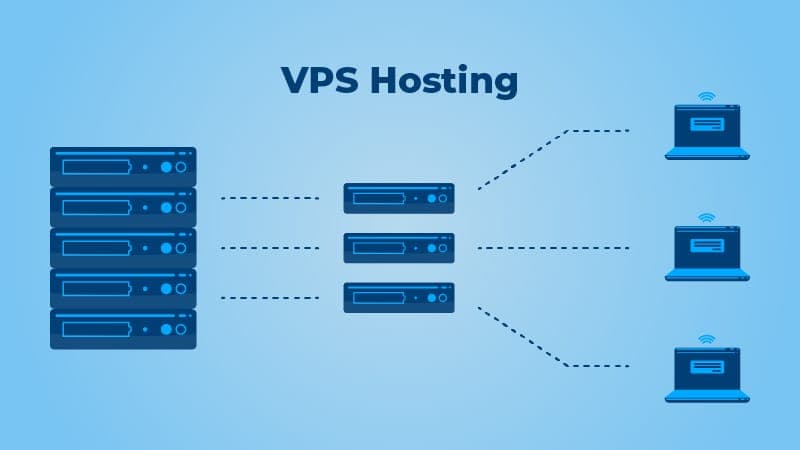
2. VPS Hosting
A Virtual Private Server (VPS) is an affordable solution for smaller RedM servers.
- Advantages
- Cheaper than a dedicated server
- Scalable solution
- Full root access
- Disadvantages
- Shared resources with other users
- Limited performance compared to a dedicated server
3. Dedicated Server Hosting
If you are planning a large RedM server with many players, a dedicated server is the best option.
- Pros:
- Maximum performance and stability
- No resource limitations
- Perfect for large communities
- Disadvantages
- Higher price
- Technical setup can be more complex
4. Cloud Server Hosting
Cloud hosting provides flexibility and high availability by using multiple servers to distribute the load.
- Advantages
- Scalability
- Pay only for what you use
- Automatic redundancy
- Disadvantages
- Can be more expensive in the long run
- Requires more technical understanding for optimization
How to set up a RedM server
1. Choose your hosting plan
Decide whether you want to run your server on Game Server Hosting, VPS, Dedicated Server, or Cloud Hosting based on your budget and number of players.
2. Install RedM Server Software
Windows Installation Guide
- Download the latest RedM artifacts from the official website.
- Extract the files into a folder on your server.
- Configure
server.cfgthe file with the server name, number of players, and plugins. - Start the server with:
FXServer.exe +exec server.cfg
Linux Installation Guide
- Update the server software:
sudo apt update && sudo apt upgrade -y - Install necessary dependencies:
sudo apt install git screen -y - Download RedM artifacts:
mkdir -p ~/redm-server cd ~/redm-server wget https://runtime.redm.net/artifacts/redm/latest.zip unzip latest.zip - Start the server with:
./FXServer +exec server.cfg
3. Optimizing RedM Server Performance
To ensure a stable server experience, it is important to optimize server performance:
- Update software regularly to avoid security vulnerabilities.
- Monitor resource usage to ensure optimal performance.
- Optimize scripts and plugins by using only necessary resource-intensive features.
- Use DDoS protection to prevent attacks on your server.
Community Management and Moderation
To create a successful RedM server, it is important to build a strong community:
- Create a Discord server for communication and support.
- Implement rules and moderation to keep the gaming experience positive.
- Use whitelisting to approve players and ensure a controlled server experience.
Conclusion: Choose the Right RedM Hosting
Running a RedM server requires a powerful hosting solution that can handle the game's demands. By choosing the right hosting option, you can ensure a smooth and stable gaming experience for your players.
Ready to start your own RedM server? Explore our RedM Game Server Hosting and get the best performance for your server today!